.png)
Removing Extra Line Separators from Reference Payloads Using ASTER Scripts
Problem
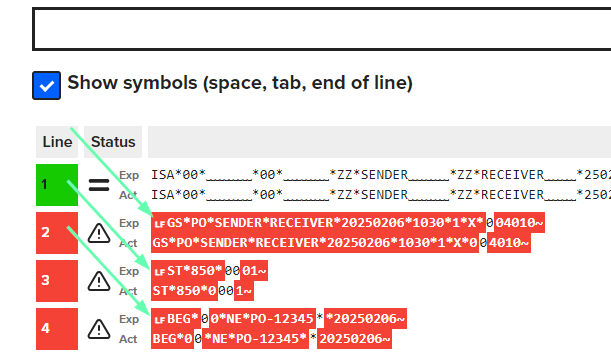
When manually importing reference flat files (e.g. EDI files), extra spaces or line breaks can be accidentally added. These appear as additional line separators at the beginning of reference payloads when using "Show Symbols" in the comparison view.
Prerequisites
-
An ASTER script that removes the special character at the beginning of the line (prepared in advance or provided by your team).
-
Access to the Int4 Suite Fiori home screen and the relevant automation object.
Steps
Step 1: Identify the issue
-
Open the test case comparison in Int4 Suite.
-
Click Show Symbols.
-
Confirm that extra line separators appear at the beginning of the reference payloads.
Step 2: Create the ASTER script
-
Go to the home screen of Int4 Suite.
-
Click on Scripts.
-
Click Create (new script).
-
Set the script type to ASTER Script.
-
Click Create.
-
Import or paste the prepared ASTER script that removes the leading special character.
PAYLOAD = IF(_DESIGN_MODE_, GET_TC_OUTPUTS()[1], GET_TC_OUTPUTS()[1] ); IF(LEN(PAYLOAD) == 0, PAYLOAD = GET_TC_PAYLOAD("L") ); CLEAN_PAYLOAD = RREPLACE("[\r\n]+", "", PAYLOAD); RETURN CLEAN_PAYLOAD -
Click Save.
Step 3: Assign the script to the automation object
-
Navigate to the automation object used by your test case.
-
Click Edit next to Payload Processing.
-
Click Create.
-
Choose Reference Output Payload with ASTER Script as the method.
-
Select the previously created ASTER script as the parameter.
-
Click Save.
Step 4: Re-execute and verify
-
Go back to the test case.
-
Execute the test case.
-
Open the test case Details.
-
Click Show Symbols.
-
Confirm that the extra line separators at the beginning of the reference payload are no longer present.
Notes
-
This approach modifies the reference output payload dynamically during test execution. You do not need to edit each payload file individually.
-
Only apply this fix if you are certain the extra characters were added accidentally and the receiving system does not require them.