.png)
Create Int4 Suite Access Roles in SAP PFCG
This article describes how to create roles from templates. Full list of templates can be found:
https://help.int4.com/int4-suite-knowledge-center-library/3.15/role-templates
You can use this manual and the short video to create your own roles accordingly.
You will find informations regarding setting up authorizations to Fiori Apps.
Those activities should be done by Security Expert or Basis Expert, or Authorization Expert
-
Create the admin role from a template
-
Open PFCG to create a new role.
-
Create a single role.
-
Provide the name for the role.
-
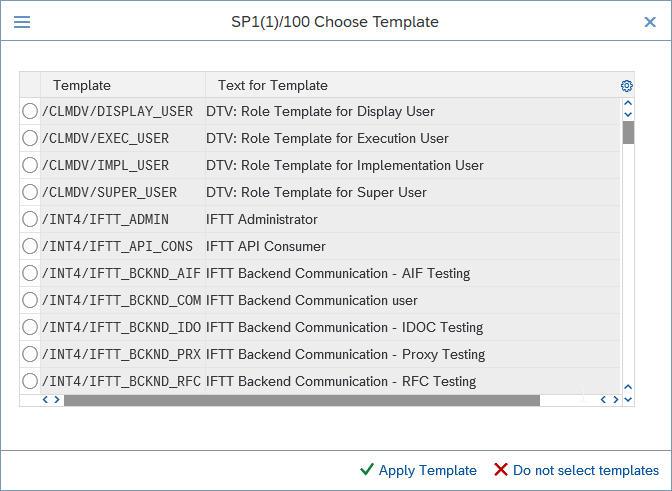
Go to Change Authorization Data and apply the template, for example:
/INT4/INTT_ADMIN. -
Generate again, save, and run user comparison so the assigned user gets the updated authorizations.
-
Create the Fiori and Odata access role
-
Create a second single role for Fiori access.
-
Save the role and switch to the Menu tab.
-
Under SAP Fiori Launchpad, add the required catalogs.
-
Add all catalogs that start with the INT4 prefix.
-
Then add the required launchpad groups.
-
Save the role after the catalogs and groups are added.
Full list of Fiori Tile Groups and Tile Catalogs:
|
Node Type |
Object |
Text |
|---|---|---|
|
SAP Fiori Tile Catalog |
/INT4/KB_BC |
Int4 Suite: Knowledge Base |
|
SAP Fiori Tile Catalog |
/INT4/CONF_BC |
Int4 Suite: Configuration |
|
SAP Fiori Tile Catalog |
/INT4/AT_BC |
Int4 Suite: API Tester |
|
SAP Fiori Tile Catalog |
/INT4/SV_BC |
Int4 Suite: Messenger |
|
SAP Fiori Tile Catalog |
/INT4/IFMT_BC |
Int4 Suite: CPI Migrator |
|
SAP Fiori Tile Catalog |
/INT4/ML_BC |
Int4 Suite: Machine Learning |
|
SAP Fiori Tile Catalog |
/INT4/IDOC_BC |
Int4 Suite: IDocs |
|
SAP Fiori Tile Catalog |
/INT4/BOOMI_BC |
Int4 Suite: Boomi |
|
SAP Fiori Tile Catalog |
/INT4/TPM_BC |
Int4 Suite: TPM |
|
SAP Fiori Tile Catalog |
/INT4/DIM_BC |
Int4 Suite: Dimensions |
|
SAP Fiori Tile Catalog |
/INT4/AI_BC |
Int4 Suite: AI |
|
SAP Fiori Tile Group |
/INT4/KB_BCG |
Int4 Suite: Knowledge Base |
|
SAP Fiori Tile Group |
/INT4/CONF_BCG |
Int4 Suite: Configuration |
|
SAP Fiori Tile Group |
/INT4/AT_BCG |
Int4 Suite: API Tester |
|
SAP Fiori Tile Group |
/INT4/SV_BCG |
Int4 Suite: Messenger |
|
SAP Fiori Tile Group |
/INT4/IFMT_BCG |
Int4 Suite: CPI Migrator |
|
SAP Fiori Tile Group |
/INT4/ML_BCG |
Int4 Suite: Machine Learning |
-
Add or verify service authorizations for the Fiori role
-
Go to the Authorizations tab and generate the profile.
-
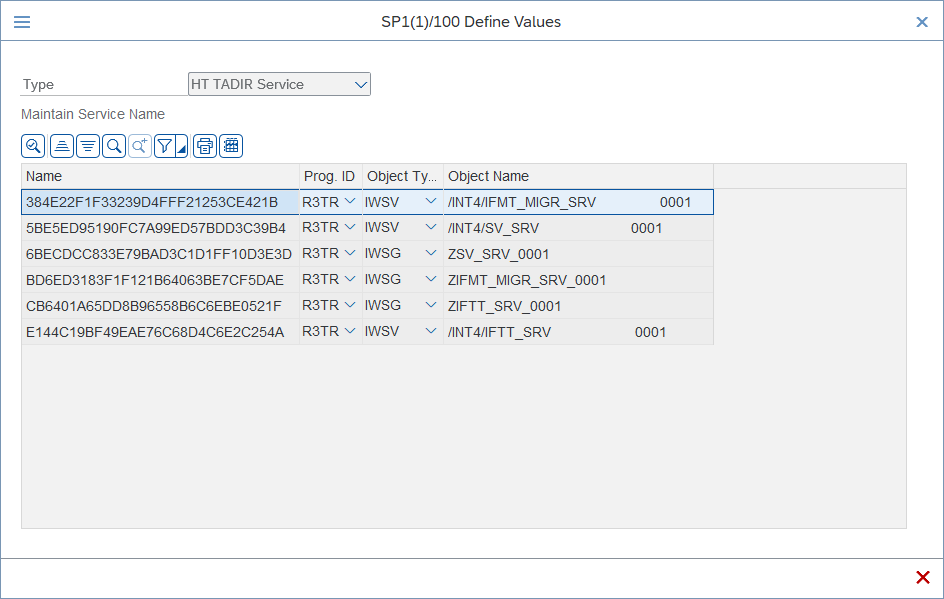
Check whether the needed service authorization objects were added automatically.
-
If they are missing, add them manually under the service authorization object S_SERVICE.
-
Use the pencil/edit option to add the required service entries.
Name for those object will be different in each system, please use Object Name to assign those objects
Full list of OData Services Authorizations
|
Program ID |
Object Type |
Object Name |
Int4 Product |
|---|---|---|---|
|
R3TR |
IWSV |
/INT4/IFTT_SRV 0001 |
INT4 Suite |
|
R3TR |
IWSG |
ZIFTT_SRV_0001 |
INT4 Suite |
|
R3TR |
IWSV |
/INT4/IFMT_MIGR_SRV 0001 |
INT4 Automated Migration Tool |
|
R3TR |
IWSG |
ZIFMT_MIGR_SRV_0001 |
INT4 Automated Migration Tool |
|
R3TR |
IWSV |
/INT4/SV_SRV 0001 |
INT4 Suite: Messenger |
|
R3TR |
IWSG |
ZSV_SRV_0001 |
INT4 Suite: Messenger |
-
Create the helper role for table access
-
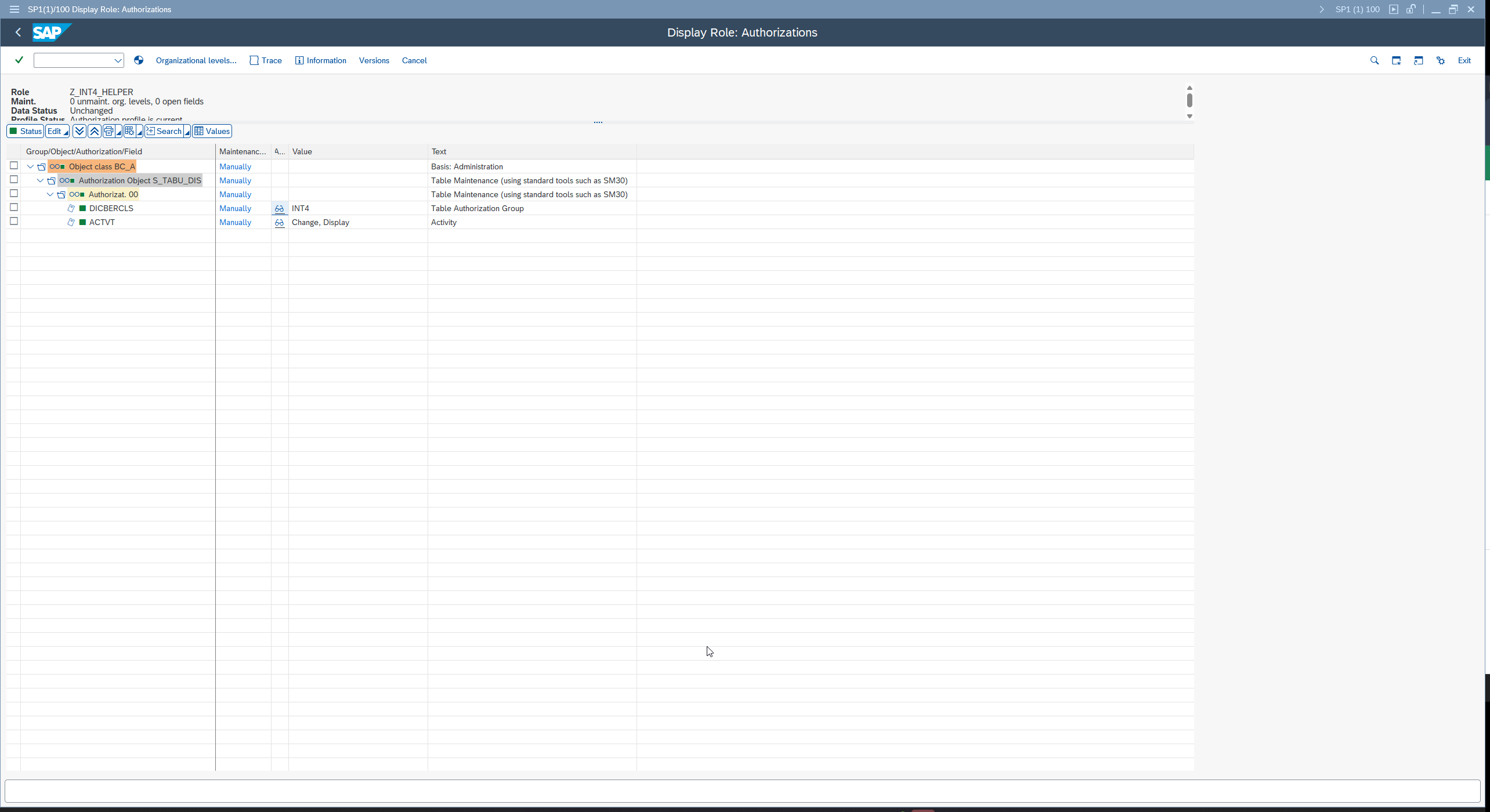
Create a third role called helper.
-
Go to Authorizations and generate the profile.
-
Add the table authorization object manually S_TABU_DIS.
-
Set the authorization group to INT4.
-
Set the activity values to 02 and 03.
-
Generate the role, save it, and assign the user.
|
Description |
Object |
Field Name |
Activities |
|---|---|---|---|
|
View / Edit Int4 Suite entries |
S_TABU_DIS |
ACTVT |
02
|
|
DICBERCLS |
INT4 |