.png)
How to Validate the IDoc Output and Handle Expected Differences
Hands-on tutorial - Part 4 of 5: SAP Backend Validation Series
This guide shows you the third validation approach: end-to-end interface validation. You will configure the Automation Object to capture and compare the IDoc generated by SAP PO middleware, then learn how to handle expected differences (dates, timestamps, system-generated numbers) using the payload validation ignore list.
Overview
In the previous guides you learned how to:
-
Part 1: Simulate an external system sending a Purchase Order
-
Part 2: Make each simulated message uniquely identifiable
-
Part 3: Validate the Sales Order created in the SAP backend using database rules
This guide adds middleware output validation. After the simulation, Int4 Suite will capture the IDoc produced by SAP PO and compare it field-by-field against the reference IDoc stored with the test case.
Because some fields are expected to differ between runs (Purchase Order number, creation date, creation time, SAP PO message ID), you will also learn how to manage these differences using the payload validation ignore list.
At the end of this guide you will have:
-
Middleware output validation enabled on the Automation Object
-
A new test case that contains both input and output payloads
-
A clean, repeatable comparison in which only meaningful differences are flagged
Step-by-step instructions
1. Enable validation of the middleware output message
The earlier setup already simulated the external system message and validated the reference Sales Order against the QA Sales Order. The next goal is to validate the IDoc generated by SAP PO middleware as part of the processing.
-
Open the existing Automation Object and switch it to edit mode.
-
In the test case validation section, select Validate message output.
-
If you are using the standard SAP PO message version, you do not need to fill in a message version after processing.
-
Only specify a post-processing message version if you are using a different caption - for example one coming from an adapter module like EDI.
2. Create a new test case so output messages are captured
Existing test cases only contain the input payload - they cannot validate the newly added output message. Create a new test case so both input and output are downloaded together:
-
Create a new test case using the same Automation Object.
-
Choose the same test type: PI GUID E2Einbound.
-
Select the Production PO environment and the relevant document number.
-
Generate the test case with the desired number of messages (for example, 10).
-
Save the test case so the system collects both:
-
The input message
-
The output message / IDoc generated by middleware
-
💡 Why a new test case? Existing test cases were created with only the input payload because validation of the output was not yet enabled. Re-running them would not capture the IDoc. Always re-generate test cases after enabling output validation.
3. Run the test case in QA and compare production vs. generated IDoc
-
Execute the newly created test case in the QA environment.
-
After the run completes, open the test case details.
-
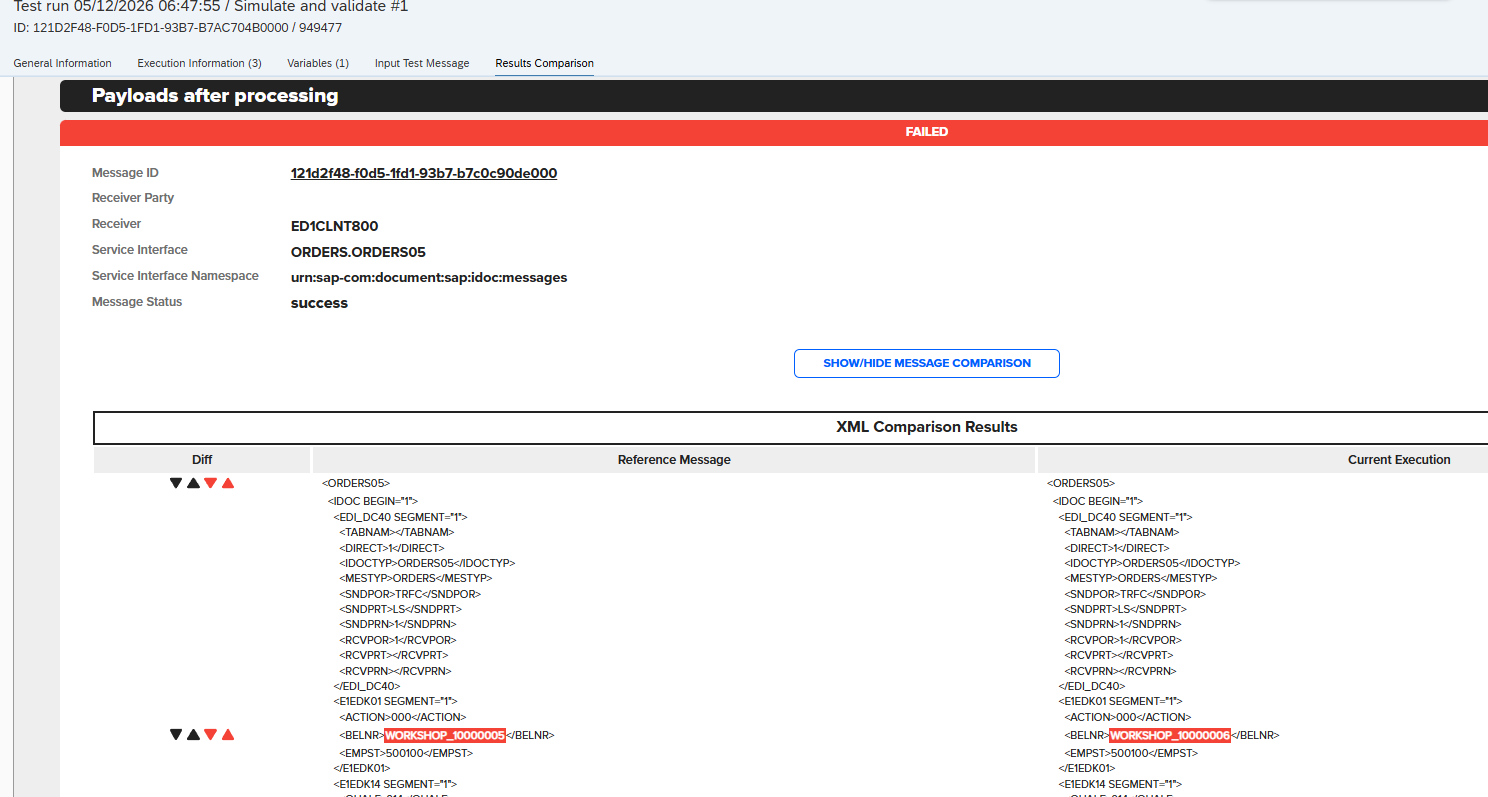
Review the payload comparison:
-
Left side: the production IDoc saved with the test case
-
Right side: the IDoc generated during the QA execution
-
-
Expect to see differences in fields that change every time the message is injected - for example, the dynamic PO value from your variable.
These differences are normal and will be handled in the next step.
4. Add expected differences to the payload validation ignore list
To finalize the scenario, mark fields that are expected to differ as exceptions:
-
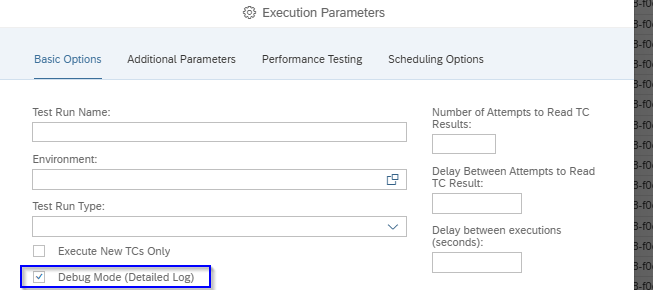
Re-run the test case in debug mode with detailed logging enabled.
-
When the test fails on an expected difference, use the new option next to the failed field to create an exception.

-
Add a short explanation for why the difference is acceptable (for audit purposes).
-
Save the exception.
-
Repeat for other expected differences, typically:
-
Creation date
-
Creation time
-
SAP PO message ID inside the IDoc
-
Any other system-generated, run-specific field
-
⚠️ Best practice: Always add a meaningful description for each exception. Months later, anyone reviewing the test case should understand why a field is being ignored without having to ask.
5. Revalidate to confirm the ignored fields no longer fail the test
-
After adding the exceptions, run the test case again.
-
Use Revalidate to recheck the comparison results.
-
Fields added to the payload validation ignore list should no longer cause failures.
-
Repeat the process for any remaining fields that are expected to vary between runs.
When done, only meaningful regressions will fail the test - exactly what you want for continuous regression testing.
Troubleshooting
|
Issue |
Likely cause |
Resolution |
|---|---|---|
|
New test case still has no output payload |
Output validation was not saved on the Automation Object before creating the test case |
Re-open the Automation Object, confirm Validate message output is enabled, then re-create the test case |
|
Output IDoc not captured for non-standard versions |
Custom message version (e.g. from adapter module logic) |
Set the post-processing message version field on the Automation Object |
|
Too many fields differ on every run |
Variables (e.g. dates, system IDs) not in the ignore list or real defects/issues spotted |
Add each one as an exception with a justification - see step 4 |
Together, these guides cover the full Int4 Suite simulation-plus-validation pattern: from importing real production messages, through making them safe to replay, to validating both the backend document and the middleware output.
What's next
Video reference
🎥 Full walkthrough on Loom: https://loom.com/share/3d55b8b7fd9b41e88454531266e38398